Appearance
Add or edit nodes
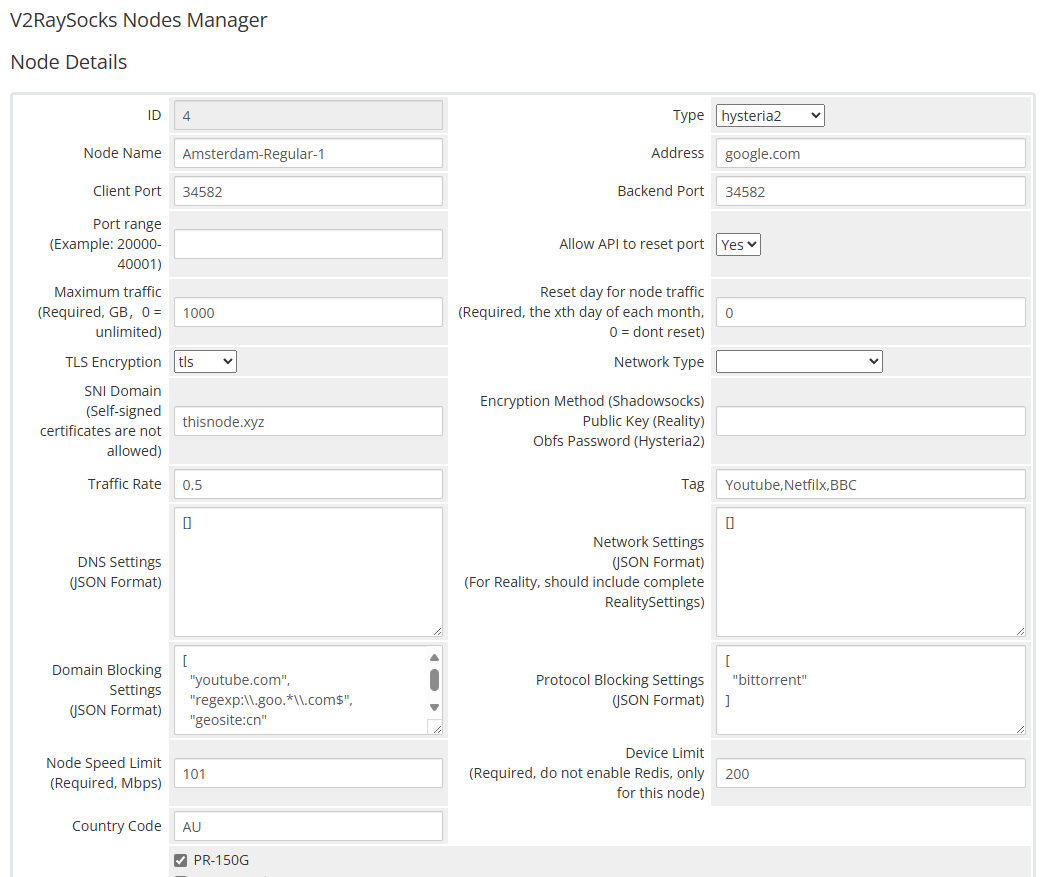 Node details (this screenshot predates the case dropdowns described below)
| Columns | Tips |
|---|---|
| Node Name | The name of the node can be prefixed with [NumberLetter-] for sorting, such as 0A- in 0A-TEST-NODE-6. This prefix will not be displayed to users. |
| Address | The address of the node, which can be an IP address or a domain name. If the node is forwarded, add the address of the forwarding server here. |
| Client Port | The port of the node. If the node is forwarded, add the port of the forwarding server here. |
| Backend Port | The port on which the node backend runs |
| Traffic Rate | Traffic calculation factor. Overridden for time windows covered by the node's Dynamic Rate Case, if one is selected. |
DNS / Route / Outbound / Inbound / domain / protocol cases
Instead of free-text JSON boxes, the node edit page has six dropdowns — DNS Case, Route Case, Outbound Case, Inbound Case, Domain Blocking Case, and Protocol Blocking Case — that let you pick which named case this node should use. The cases themselves (and their JSON content) are maintained on the Additional node config page; leaving a dropdown unselected means that node doesn't use that field at all.
Network Setting JSON is still a free-text field directly on the node. If you leave it empty, the node falls back to the global default set on the Additional Node Config page.